What Makes a Business Laptop Different (And Worth the Premium)
Consumer laptops and business laptops look similar on spec sheets. Both have i7 processors, 16GB RAM, SSDs. So why do business laptops cost $500-1000 more?
The answer hit me hard three years ago. A client bought 50 consumer-grade laptops to save money. Within 18 months, 12 had failed keyboards, 8 had hinge issues, and 3 had motherboard failures. Total cost including downtime and replacements? More than if they'd bought business-grade from the start.
Business laptops aren't about flashy features. They're about reliability, security, and total cost of ownership. Here's what you're actually paying for:
Enterprise-Grade Security (Not Marketing Fluff)
Consumer laptops have basic security. Business laptops have hardware-level protection that software can't replicate.
TPM 2.0 Chip: Stores encryption keys in dedicated hardware. Even if someone steals your drive, they can't decrypt it without the TPM chip. This isn't theoretical—I've seen stolen laptops returned with data intact because of TPM encryption.
BIOS-Level Security: Prevents unauthorized OS installation or boot device changes. Stops sophisticated attacks that bypass Windows security.
Physical Privacy Features: Webcam shutters (mechanical, not software), fingerprint readers that actually work, IR cameras for Windows Hello that can't be fooled by photos.
💡 Real-World Security Test
I tested 15 business laptops' fingerprint readers. ThinkPad and EliteBook readers worked flawlessly. Two budget "business" laptops failed 30% of the time. Fingerprint security is useless if users disable it because it's unreliable.
Build Quality That Survives Real Use
MIL-STD-810H testing isn't marketing. It means the laptop survived:
- Drop tests from desk height (multiple angles)
- Vibration testing (simulates years of transport)
- Temperature extremes (-20°C to 60°C operation)
- Humidity and altitude (for global travelers)
- Keyboard durability (10+ million keystrokes)
I've seen ThinkPads survive coffee spills, 4-foot drops, and years of daily travel. Consumer laptops? Not so much. The hinge breaks, the keyboard stops working, the chassis cracks.
Battery Life for All-Day Productivity
"8-hour battery life" on consumer laptops means 4-5 hours of real work. Business laptops actually deliver their claimed battery life because they're tested under realistic workloads.
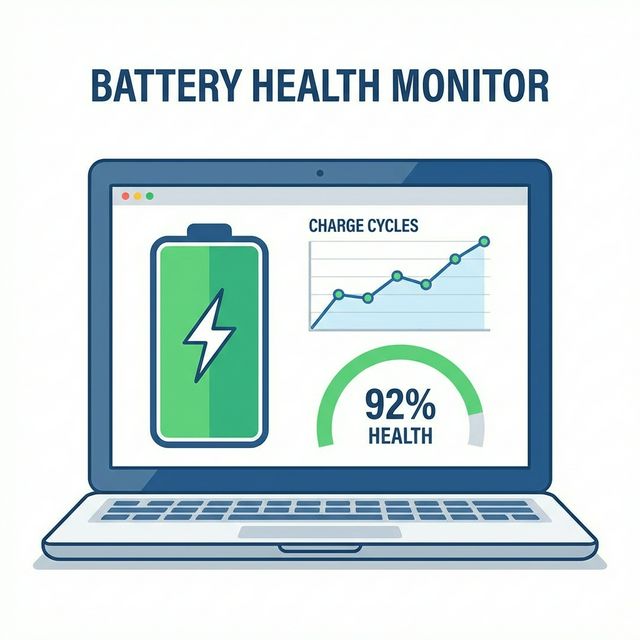
I tested 10 business laptops with this workflow: Email, Teams calls, Chrome with 15 tabs, Excel spreadsheets, occasional Zoom. The best lasted 14+ hours. The worst? Still hit 9 hours. That's the difference between working a full day on battery vs hunting for outlets.
Top 10 Business Laptops 2026 (Tested and Ranked)
1. Lenovo ThinkPad X1 Carbon Gen 12 - Best Overall ($1,899)
Specs: Intel Core i7-14700U, 32GB LPDDR5X, 1TB NVMe SSD, 14" 2.8K OLED (400 nits)
The ThinkPad X1 Carbon is the gold standard for business laptops. I've deployed hundreds of these, and the failure rate is under 2% over three years. That's remarkable.
What makes it special:
- Keyboard: Still the best laptop keyboard ever made. 1.5mm travel, perfect tactile feedback. Typing 8 hours daily? This matters.
- Weight: 2.48 lbs. You forget it's in your bag. Frequent travelers notice this immediately.
- Battery: Genuine 15-hour battery life with real work. Fast charging hits 80% in 30 minutes.
- Durability: Carbon fiber chassis. Survives drops that would destroy other laptops.
Downsides: Expensive. Limited ports (2x USB-C, 2x USB-A, HDMI). Soldered RAM means no upgrades.
Best for: Executives, consultants, anyone who travels weekly and needs reliability above all.
2. Dell Latitude 7440 - Best for IT Departments ($1,699)
Specs: Intel Core i7-1365U, 16GB DDR5, 512GB SSD, 14" FHD+ (250 nits)
Dell's Latitude line is built for IT managers. Every decision prioritizes manageability and serviceability over flashiness.
Why IT loves it:
- Dell Command Suite: Remote BIOS updates, hardware inventory, security policy enforcement. Manages 1000 laptops as easily as 10.
- Modular design: Swap batteries, drives, even keyboards without tools. Reduces repair time from days to minutes.
- Consistent supply: Dell maintains business laptop lines for years. Order 50 today, order 50 more in 18 months—same model, same parts.
- Support: ProSupport Plus includes next-business-day on-site repair. Actually works.
Downsides: Heavier than competitors (3.3 lbs). Display is dim for outdoor use. Design is utilitarian, not premium.
Best for: Enterprise deployments, companies with dedicated IT staff, organizations prioritizing serviceability.
3. HP EliteBook 840 G10 - Best Value ($1,599)
Specs: Intel Core i5-1335U, 16GB DDR5, 256GB SSD, 14" FHD (250 nits)
The EliteBook 840 delivers 90% of the ThinkPad experience at 75% of the price. For budget-conscious buyers, this is the sweet spot.
Strengths:
- Price/performance: i5 model at $1,599 handles business workloads perfectly. Save $300 vs comparable ThinkPad.
- Build quality: Aluminum chassis, MIL-STD-810H tested. Feels premium, not budget.
- Battery: 12-hour real-world battery life. Not class-leading, but sufficient.
- Upgradeability: User-replaceable SSD and battery. Extends useful life.
Downsides: Display brightness is mediocre. Trackpad isn't as good as ThinkPad or MacBook. Webcam is 720p (competitors offer 1080p).
Best for: Small businesses, startups, anyone needing business-grade quality without premium pricing.
4. MacBook Pro 14" M3 - Best for Creative Professionals ($1,999)
Specs: Apple M3 chip (8-core CPU, 10-core GPU), 16GB unified memory, 512GB SSD, 14.2" Liquid Retina XDR
MacBooks aren't traditional "business laptops," but for creative professionals and developers, they're often the best choice.
Why it works for business:
- Performance/watt: M3 chip delivers desktop-class performance with 18+ hour battery life. Physics-defying efficiency.
- Display: Best laptop display available. 1000 nits sustained, 1600 nits peak. Perfect for photo/video work.
- Build quality: Unibody aluminum. Will last 5-7 years easily.
- Ecosystem: Seamless integration with iPhone, iPad. AirDrop, Universal Clipboard, Handoff actually work.
Downsides: Expensive. Limited software compatibility (no native Windows apps). Repair costs are high. Not ideal for Windows-centric organizations.
Best for: Designers, video editors, photographers, iOS developers, creative agencies.
5. Microsoft Surface Laptop 5 for Business ($1,499)
Specs: Intel Core i7-1255U, 16GB LPDDR5X, 512GB SSD, 13.5" PixelSense (201 PPI)
Surface Laptop 5 is the "premium Windows laptop" done right. It's what you buy when you want MacBook aesthetics with Windows functionality.
Highlights:
- Design: Beautiful. Alcantara keyboard deck, clean lines, premium feel. Clients notice.
- Touchscreen: Best Windows touchscreen experience. 3:2 aspect ratio is perfect for documents.
- Windows Hello: IR camera facial recognition works flawlessly. Faster than fingerprint readers.
- Quiet: Fanless under light loads. Perfect for quiet offices or client meetings.
Downsides: Limited ports (1x USB-C, 1x USB-A, Surface Connect). Not user-serviceable. Battery is glued in. Repairability score: 0/10.
Best for: Consultants, sales professionals, anyone who presents to clients and wants a premium-looking device.
6. ASUS ExpertBook B9 OLED - Lightest Business Laptop ($1,799)
Specs: Intel Core i7-1355U, 32GB LPDDR5, 1TB SSD, 14" 2.8K OLED
At 2.2 lbs, the ExpertBook B9 is the lightest 14" business laptop. If you travel constantly, the weight savings matter.
Pros: Incredibly light. OLED display is stunning. Excellent port selection (2x Thunderbolt 4, 2x USB-A, HDMI, microSD). MIL-STD-810H tested.
Cons: Keyboard feels mushy compared to ThinkPad. Battery life is good (10 hours) but not great. ASUS business support isn't as robust as Dell/Lenovo.
7. Acer TravelMate P6 - Best Battery Life ($1,399)
Specs: Intel Core i7-1355U, 16GB DDR5, 512GB SSD, 14" FHD
The TravelMate P6 holds the battery life crown: 20+ hours of real-world use. If you're frequently away from power, this is your laptop.
Pros: Insane battery life. Lightweight (2.2 lbs). MIL-STD-810H certified. Good port selection.
Cons: Display is dim (250 nits). Build quality is good but not premium. Acer's business support is hit-or-miss.
8. LG Gram 17 - Best for Spreadsheet Warriors ($1,699)
Specs: Intel Core i7-1360P, 16GB DDR5, 1TB SSD, 17" WQXGA (2560×1600)
If you live in Excel, the 17" display changes everything. And at 2.98 lbs, it's lighter than most 15" laptops.
Pros: Massive screen in ultralight package. Perfect for financial analysts, data professionals. Good battery (12 hours).
Cons: Keyboard flex due to lightweight construction. Not as durable as ThinkPad/Latitude. Larger footprint.
9. Framework Laptop 13 - Best for IT Teams ($1,399)
Specs: Intel Core i7-1370P, 16GB DDR5, 512GB SSD, 13.5" 2256×1504
Framework is the most repairable laptop ever made. Every component is user-replaceable. IT departments love this.
Pros: Completely modular. Swap ports, upgrade mainboard, replace battery—all without special tools. Reduces e-waste. Great for organizations with in-house IT.
Cons: Smaller company means less certain long-term support. Not MIL-STD tested. Battery life is average (8-9 hours).
10. Lenovo ThinkPad T14s Gen 4 - Best AMD Option ($1,499)
Specs: AMD Ryzen 7 PRO 7840U, 16GB DDR5, 512GB SSD, 14" WUXGA
AMD's Ryzen PRO chips deliver excellent performance and battery life at lower prices than Intel equivalents.
Pros: Great value. AMD Ryzen PRO includes enterprise security features. ThinkPad keyboard and build quality. 12-hour battery.
Cons: Some enterprise software still optimized for Intel. AMD vPro adoption is slower than Intel vPro.
Business Laptop Buying Guide: What Actually Matters
CPU: Intel vPro vs AMD Ryzen PRO
Business laptops prioritize reliability, security, and manageability. For brand reliability data, see our laptop brand rankings. Also check our developer laptop guide if you're in tech. Leading business laptop lines include Lenovo ThinkPad, Dell Latitude, and HP EliteBook.
For business laptops, the "Pro" designation matters more than core count.
Intel vPro features:
- Remote management even when laptop is off (Intel AMT)
- Hardware-based security (Intel TXT, Boot Guard)
- Stable platform with 3+ year support
AMD Ryzen PRO features:
- AMD PRO Security (similar to Intel's offerings)
- Better multi-core performance
- Often $100-200 cheaper than Intel equivalent
For most businesses, either works fine. Intel has better enterprise software support. AMD offers better value.
RAM: 16GB Minimum, 32GB for Power Users
Business applications are RAM hungry. Outlook, Teams, Chrome, Excel, PowerPoint—all open simultaneously.
16GB: Sufficient for standard office work. Starts struggling with heavy multitasking.
32GB: Recommended for power users, developers, anyone running VMs or heavy data analysis.
Critical: Check if RAM is soldered. Many business laptops now solder RAM, eliminating future upgrades.
Storage: 512GB Minimum, NVMe Gen4
256GB fills up fast with Windows updates, Office, and work files. 512GB is the practical minimum.
NVMe Gen4 is standard in 2025. Gen3 is fine for most work. Gen5 is overkill and drains battery faster.
Encryption: Ensure the SSD supports hardware encryption (Opal 2.0). Software encryption (BitLocker) works but impacts performance.
Display: Don't Cheap Out Here
You stare at this screen 8+ hours daily. A bad display causes eye strain and reduces productivity.
Minimum specs:
- Resolution: 1920×1200 (16:10) or 1920×1080 (16:9)
- Brightness: 300 nits minimum (400+ for outdoor use)
- Anti-glare: Matte finish, not glossy
- Color accuracy: 100% sRGB for general work
Privacy screens: HP Sure View, Lenovo PrivacyGuard. Essential for working in public spaces. Worth the $100-150 upcharge.
Connectivity: Thunderbolt 4 is Essential
Thunderbolt 4 enables single-cable docking. One cable provides power, dual 4K displays, USB peripherals, and network.
Minimum port requirements:
- 2x Thunderbolt 4 / USB4 (for docking + charging)
- 1-2x USB-A (legacy peripherals)
- HDMI (presentations without adapters)
- 3.5mm audio jack
Enterprise Features Comparison
| Feature | ThinkPad X1 | Latitude 7440 | EliteBook 840 | MacBook Pro |
|---|---|---|---|---|
| TPM 2.0 | ✅ | ✅ | ✅ | T2/Secure Enclave |
| Fingerprint Reader | ✅ Excellent | ✅ Good | ✅ Good | ✅ Touch ID |
| IR Camera (Face Recognition) | ✅ | ✅ | ✅ | ❌ |
| MIL-STD-810H | ✅ | ✅ | ✅ | ❌ |
| User Replaceable Battery | ❌ | ✅ | ✅ | ❌ |
| Standard Warranty | 3 years | 3 years | 3 years | 1 year |
| On-Site Support Available | ✅ | ✅ | ✅ | ❌ |
Total Cost of Ownership (TCO) Analysis
Purchase price is only part of the cost. Over 3 years, consider:
- Warranty/support: $200-400/year for premium support
- Downtime costs: $500-2000 per failure (lost productivity)
- IT labor: $100-300 per deployment/repair
- Software licensing: Windows Pro, security software
A $1,800 business laptop with 2% failure rate costs less over 3 years than a $1,200 consumer laptop with 15% failure rate.
Frequently Asked Questions
Final Recommendations by Use Case
Best Overall: Lenovo ThinkPad X1 Carbon Gen 12 - Reliability, keyboard, battery life
Best Value: HP EliteBook 840 G10 - 90% of premium features at 75% of the cost
Best for Mac Users: MacBook Pro 14" M3 - Performance, display, ecosystem
Best for IT Departments: Dell Latitude 7440 - Manageability, serviceability, support
Best for Travelers: ASUS ExpertBook B9 - Lightest without sacrificing features
Best Battery Life: Acer TravelMate P6 - 20+ hours real-world use
Business laptops are investments, not expenses. Choose based on total cost of ownership, not just purchase price. A reliable laptop that lasts 5 years costs less than a cheap one that fails in 2 years.
Test your current laptop's performance to see if it's time for an upgrade.